NobleProg delivers expert-led MS Teams training courses across Nepal, empowering professionals and organizations with the latest industry skills. Leveraging our extensive presence in the Indian subcontinent, we provide accessible and high-quality learning solutions tailored to the local market. Participants gain valuable insights through interactive sessions designed to enhance career growth and organizational performance.
Delivered through interactive, instructor-led live sessions—either online or on-premises—our MS Teams training provides hands-on experience in leveraging the platform to conduct engaging virtual meetings and live events.
These programs are offered as either "online live training" (also referred to as "remote live training") or "onsite live training." Online live training is facilitated via an interactive remote desktop environment. Onsite live training can be conducted locally at your premises in Nepal or at NobleProg corporate training centers in Nepal.
MS Teams is widely recognized as Microsoft Teams.
NobleProg – Your Local Training Partner
Nepal, Kathmandu - Classroom
near Soaltee, Tahachal Marg, Kathmandu, Nepal, 44600
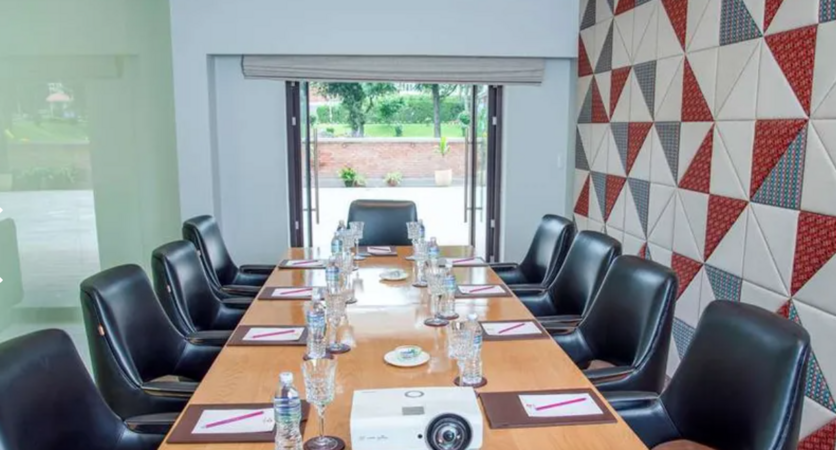
Set in Kathmandu, this classroom is well located near Tahachal Marg with all amenities and WiFi.
For Sales Enquires and Meetings
All our centres have batches running on weekdays and weekends hence, please note that, in most cases, usually we are not able to organise ad hoc sales meetings, especially on our classrooms as they are all occupied with ongoing training sessions . Please contact us by e-mail or phone at least one day earlier to make an appointment with one of our consultants at our corporate offices.
Nepal, Thamel, KTM - Classroom
near Radisson , Ward 2, Kathmandu, Nepal, 44600
Set in Kathmandu, this classroom is well located near Thamel, with all amenities and WiFi.
For Sales Enquires and Meetings
All our centres have batches running on weekdays and weekends hence, please note that, in most cases, usually we are not able to organise ad hoc sales meetings, especially on our classrooms as they are all occupied with ongoing training sessions . Please contact us by e-mail or phone at least one day earlier to make an appointment with one of our consultants at our corporate offices.
This live, instructor-led training in Nepal provides an introductory overview of Microsoft Teams and Forms for new users. Attendees will gain the skills to manage channels, design digital forms, and integrate these tools to facilitate seamless data collection and enhance team communication workflows within an interactive learning setting.
Boost your operational efficiency with this Microsoft Teams course in Nepal. Acquire the skills to manage team structures, automate processes using Power Automate, and refine teamwork through integrated Microsoft 365 tools. This program is ideal for professionals seeking practical expertise to optimize their day-to-day workflows.
Get exam-ready for MS-721 through this practical training module Nepal, which focuses on administering Microsoft Teams’ collaboration, voice, and security frameworks. Master the configuration of policies, governance structures, and troubleshooting techniques tailored for enterprise environments to significantly elevate your administrative proficiency.
This instructor-led, live training in Nepal (online or onsite) is targeted at intermediate-level professionals who wish to optimize their use of Microsoft Teams and Read AI to enhance meeting outcomes and workflow efficiency.
Upon completion of this training, participants will be able to:
Configure and optimize Microsoft Teams for efficient meetings.
Integrate and personalize Read AI within Teams.
Leverage AI-powered features such as summaries, transcripts, and participation analytics.
Enhance collaboration, task tracking, and follow-up actions post-meeting.
Apply advanced strategies and use cases for sustained productivity.
This instructor-led live training in Nepal (online or onsite) is designed for business professionals at the beginner level who aim to leverage Microsoft Teams alongside its robust integrations with Outlook, OneDrive, and Lists to enhance team collaboration and overall productivity.
Navigate the Teams interface, establish teams and channels, and manage communication via posts, chats, and meetings.
Schedule and attend Teams meetings through both Teams and Outlook, utilise in-meeting collaboration tools like screen sharing, and handle meeting notes and recordings.
Efficiently manage emails, calendars, and Teams meetings using Outlook, and transition smoothly between email and Teams communication workflows.
Leverage OneDrive for cloud storage, sharing, and real-time document collaboration within Teams and Outlook, including file version management and recovery.
Create, customise, and manage Lists to organise tasks and projects, collaborate with team members, and integrate Lists with Outlook and OneDrive.
Seamlessly link Teams with Outlook, OneDrive, and Lists to foster a productive, integrated work environment, thereby reducing redundant tasks and improving workflow efficiency.
Read more...
Last Updated:
Testimonials (2)
i learned alot
Rose-Ann - Heart FM
Course - Microsoft Teams: Practical Collaboration, Productivity, and Automation
The engagement and the practical examples we did as a group to get more understanding of the topic
ISABELLA - Sedibeng TVET College
Course - Microsoft Teams, Outlook, OneDrive, and Lists Integration
Online Microsoft Teams training in Nepal, Microsoft Teams training courses in Nepal, Weekend Microsoft Teams courses in Nepal, Evening MS Teams training in Nepal, MS Teams instructor-led in Nepal, Online Microsoft Teams training in Nepal, Evening MS Teams courses in Nepal, Microsoft Teams one on one training in Nepal, MS Teams private courses in Nepal, Microsoft Teams boot camp in Nepal, Weekend Microsoft Teams training in Nepal, Microsoft Teams trainer in Nepal, Microsoft Teams instructor-led in Nepal, Microsoft Teams on-site in Nepal, Microsoft Teams coaching in Nepal, Microsoft Teams classes in Nepal, Microsoft Teams instructor in Nepal